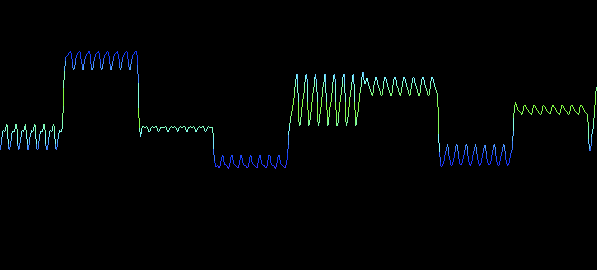
Spectral Harp is a sound toy that generates sound by letting you strum or tap strings that represent portions of the audible spectrum. You can produce more variations in sound by using the four sliders along the bottom to control spectrum density, pitch, decay, and a bit crush effect. It’s great for creating things that sound like aliens or droids talking. Here’s a sound sample:
It is essentially not much different from the 2.1.0 Beta release that many of you are familiar with and which has been included with Processing for about a year. But the documentation is now in a state that I don’t feel totally embarrassed about and that will be easier to maintain moving forward. The Minim Manual is no more (and I apologize for all the links out there on the web that will break as a result), but it just doesn’t make sense to try to maintain two sets of documentation. The point of the Manual was to give new programmers documentation that was more approachable than bare Javadocs and I think the new documentation site, generated with my hacked version of the popular proDOC, accomplishes that goal. I’ve also kept and updated the Quickstart Guide for those people who really don’t want to read very much before getting their hands wet.
I’ve initiated a pull request with the Processing team on Github, so I think you can expect to see this version of Minim included with the next release of Processing, though I can’t say exactly when that will be.
Moving forward I hope to be able to have more regular releases with bug fixes and so forth. If you experience bugs or find a hole in the documentation that you really wish could be filled, please open an Issue on Github and let me know about it!
Yesterday was the first day of the Joue le Jeu – Play Along exhibition at the Gaîté Lyrique in Paris. This show has been curated by two of my Kokoromi cohorts, Heather Kelley and Cindy Poremba, along with Lynn Hughes from Concordia University in Montréal. These three amazing women have curated a show containing both “traditional” videos games, which can be played in the gallery space by visitors, as well as a number of commissioned pieces created especially for the show. One of these commissions is my piece for the Gaîté’s Chambre Sonore.
The Chambre Sonore is a room that was custom built for the Gaîté, though not specifically for my piece, that contains a 10 channel sound system (8 mounted in the walls around the room, 1 in the ceiling, and a sub behind one of the walls), 8 pressure sensitive floor panels, and 8 color LED lights that ring the ceiling. All of these can be interfaced with from a computer under the stairs next to the room.
Elephant in the Room Wall Text
High Concept
The high concept of the piece is that the room has a digital creature living in it and that visitors can interact with the creature by stepping on the different floor panels in the room. Over time this interaction with the creature changes how it sounds so that if someone visits it more than once in a day, or comes back several days later, it should sound noticeably different than their previous visit.
Implementation
The actual implementation of the piece differs slightly from the high concept, however. I had originally envisioned creating a single complex sound generating system that would have lots of different values that could be slowly changed by stepping on the various floor panels. In this way, it would have been a very slowly evolving soundscape, without a readily discernible way for visitors to tell that they were making a difference by being in the room. Ultimately, I decided that it would make more sense within the context of the exhibition as a whole if visitors were able to easily figure out that the piece was reacting to them.
So, the piece contains five different modes that it might be in when a visitor enters and by paying close attention to the feedback provided by the lights and sounds, they should be able to figure out the “puzzle” of the mode and then intentionally push the mode to its end, triggering a transition to the next mode. The modes have the very unpoetic names of Rainstorm, Pulsing Tones, Soothe, Chirps, and Tune Maker.
Hyrax footprints stuck to the floor of the Chambre Sonore to indicate where visitors can stand to interact with the piece.
Each mode is a very different soundscape, helping to meet the goal of visitors hearing something different if they visit the room a second time. Rainstorm sounds like digital rain with a whooshing wind and if visitors stand in the correct place, they will anger a creature that will roar at them. Pulsing Tones is a large pulsing chord that visitors can turn into high-pitched static by increasing the amplitude modulation frequency applied to each note in the chord. Soothe is a gentle environment with a low frequency noise wash, long glassy tones taken from a harmonic series, and a soft heartbeat emanating from the wall. Visitors can create marimba-like tones by stepping on floor panels. Chirps emits periodic descending or ascending tones that are patched through a modulated delay effect. Visitors can use floor panels to increase and decrease the duration of the tones, or to increase and decrease the speed of the delay modulation. Tune Maker is a generative dance tune that visitors can add musical elements to simply by dancing around the floor. If they dance fast enough they are rewarded with a prerecorded dance tune that has choreographed lighting. Here’s a short video of what Rainstorm sounds and looks like.
Technology
As mentioned, there are three systems in the room that the computer interfaces with: 10 channel audio, 8 pressure sensitive floor panels, and 8 color LED lights. The audio runs through an audio card installed in the computer, out to two amplifiers. The floor panels send MIDI messages and are plugged into a USB MIDI interface. The lights are controlled using DMX and I chose to use the ENTTEC DMX USB PRO to control them. I was able to interface with all of this hardware using Processing.
Visual proof that Elephant in the Room was built with Processing.
For the audio, I used Minim, my sound library. Almost all of the sound is generated in real-time using the UGen framework. However, to handle the 10 channels, I had to bypass using an AudioOutput object and write a custom class that could deal with the sound card on the computer. JavaSound gives access to audio devices through the Mixer class. Typically, for a multi-channel sound card, the outputs will be made available as stereo pairs. So, there’s a Mixer for channels 1/2, 3/4, 5/6, and so on. Once you have a Mixer, you can ask it for a SourceDataLine that is used to write out audio data, but if a Mixer represents a stereo pair, you’re never going to be able to ask for a 10 channel SourceDataLine. In fact, even though two of the Mixers listed for the sound card were named 5.1 and 7.1, I was not able to ask those for 6 and 8 channel outputs. Instead, I gather up all the stereo pairs representing channels 1 through 10 and ask each of them for a stereo output. Then I generate 10 channels of audio from my root UGen and write out two channels of audio to each stereo output in turn. This lets me think about generating audio in 10 channel terms and makes it easy to write UGens that can pan sound around the room, send sound to just one speaker, or expand a stereo signal across several speakers.
Flashing disco lights during Tune Maker.
For the lights, I used a library for Processing called dmxP512, which made dealing with the lights super easy. At first, I thought I would have to use MIDI and a light cue building program that had been used with previous installations for the Chambre Sonore, but the direct control that dmxP512 gave me was much better. I wound up writing a wrapper class for it that let me set colors using a color variable in Processing and also let me fade colors over time. A very useful idea I came up with was to allow for animating color and intensity separately. So I can set a light to color(255,15,23), for instance, but then set the intensity to 0.2 and wind up with that color at 20% brightness. I simply multiply the RGB components by the intensity before sending them to the lights and this allows me to do stuff like blink a light by animating the intensity while at the same time slowly shifting the color from blue to pink.
The floor communicates with the computer by sending MIDI messages and I was able to receive these by writing some pretty straightforward JavaSound MIDI code. Basically, you just ask for the Transmitter object of the MIDI device that the floor is plugged into, write a class that implements the Receiver interface, and set an instance of that class as the Receiver for the Transmitter from the MIDI device. So I wrote a FloorReceiver class that I can add a FloorListener to so that the MidiMessage parsing can be in one place and other code can simply receive notifications when a floor panel goes down or up. I believe the floor is made by a French company called Interface-Z and it appears to send only one kind of MIDI message: a NOTE_ON message where the note number indicates which pad sent the message and the velocity indicates whether the panel went down (64) or up (0). I did find the floor to be a little bit frustrating to work with because some panels respond in only a small area and others a comparatively large one. This is the reason for the footprint stickers: to show people where they can stand to best interact with the room and also which direction to face so they will hopefully see a connection between where they are standing and the light that is blinking at them.
The Chambre Sonore lit with cool cyan lights.
Reception
From what I have seen, most people enjoy interacting with the room and seem to understand that they are having some kind of effect on the sound. But aside from several people I know personally who really made an effort to figure out the room, I haven’t seen anyone actually clue in to how to get a mode to an end point. Certainly, part of this is due to the fact that nothing explicitly states that this is possible, but I think it also has to do with the fact that the only feedback is from lights and sound. Each floor panel is associated with a particular light and speaker, and this relationship is maintained throughout all the modes, but unfortunately the layout of the room doesn’t physically reinforce the relationship. This isn’t a problem per se, since the piece is meant to work as simply an interactive ambient soundscape, and the piece has been switching between modes despite people not quite getting it. I had hoped to do more observation of the general public interacting with the room, but if I’m in the room, it sort of changes the experience for people, so I’ve mostly stayed out of sight. All in all, I’m pretty happy with how it’s going so far.
Elephant in the Room shows at the Gaîté Lyrique in Paris as part of Joue le Jeu – Play Along until August 12th, 2012.
Today I released my first sound making app for iPad!
WaveShaper is an app for iPad that allows you to load up any audio file and make crazy cool sounds with it. It’s a lot like record scratching, but totally maxed out. This video will do a much better job of explaining it than words ever will:
From what I can gather, it’s a project from a class being taught at the University of Michigan that uses two WiiRemotes to generate OSC messages, which are then turned into control commands for some oscillators in Minim. I love seeing this kind of stuff!
I’ve been asked many times to remove the PApplet dependency from Minim and tonight I have done it. If you’d like to try out Minim in your not-Processing Java app, you can grab the latest from the repo to do so. I’ve put the details in the Javadoc, but I’ll lay out the basics here, as well.
Processing provides two key methods that the JavaSound implementation of Minim uses when dealing with sound files. The sketchPath method is used by createRecorder to generate an absolute path from the file name provided to that method. The createInput method is used to get InputStreams for reading audio files. In order to remove the dependency on PApplet, the Minim constructor that required a PApplet as an argument has been replaced with one that takes an Object. This Object is then passed to the JavaSound implementation, which uses reflection to try to locate sketchPath and createInput methods on that Object.
What it boils down to is that if you are building a not-Processing Java app, you must simply write sketchPath and createInput methods for one of your application classes and then pass an instance of that class to the Minim constructor. The exact method signatures are:
String sketchPath(String fileName);

InputStream createInput(String fileName);
For the last month, I’ve been working on the audio portion of an installation for the Elektra Festival in Montréal along with Mickaël Lafontaine. The installation, designed by Mickaël, is an interactive touchscreen experience that is a meta-installation about Cycloïd-E, which is a “kinetic polyphonic installation” also being shown at Elektra. Mickaël had elementary and high school students watch video and listen to recordings of Cycloïd-E and then write short poems about it. These poems have been split into four “thematic spaces” where people can reconstruct the poems by dragging words into place. Each “thematic space” has a theme and a unique soundscape that evokes different aspects of Cycloïd-E. The soundscapes are constructed out of bits of recordings of Cycloïd-E, recordings of the kids reading their poems, and procedurally generated audio. I used the new UGen Framework in Minim to create all of the effects and do real-time mixing and parameter control, some of which is tied directly to touchscreen input.
If you are in Montréal, you can see the installation at the Elektra Festival for free. It’s currently installed in the lobby of Usine C and can be viewed starting from 5pm, through May 7. More details are available at the Elektra site: http://www.elektramontreal.ca/2011/#/program/ENTRE_2_MONDES/
This Sound Byte gives you control over a reasonably complex UGen chain. The meat of it is a UGen I’ve called Granulizer, which takes sample data and, based on some parameters, randomly chooses short sections of the data to loop before jumping to a different short section. This sketch gives you mouse control over the size of the sections that are looped, as well as how many times they are looped. There are also keyboard commands for controlling some effects that the Granulizer is being patched through, such as a double delay, a resonant filter, a sample repeater, a bit crusher, and a playback rate controller. The controls are outlined on the applet page, so check it out!
I never really got into using max/msp or pd, but now that I’ve got these UGens to play around with in Minim, I’m finally discovering the joy of patching!
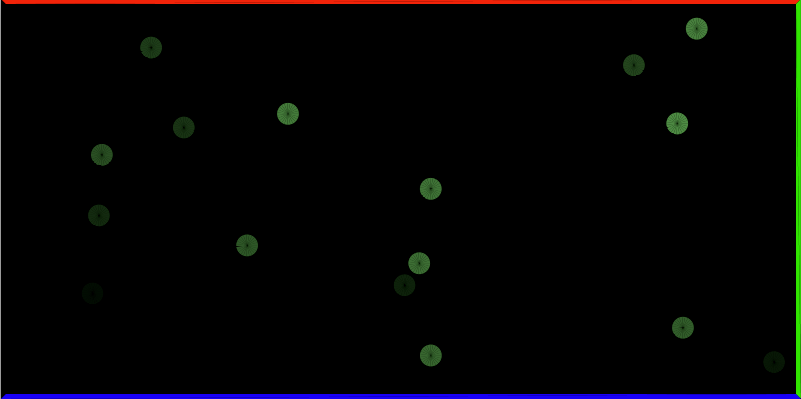
This very simple sketch is a little musical physics simulation. Click in it to spawn a ball that will bounce off the walls, producing notes each time it does. Listen with headphones for the best stereo effect. Try it!
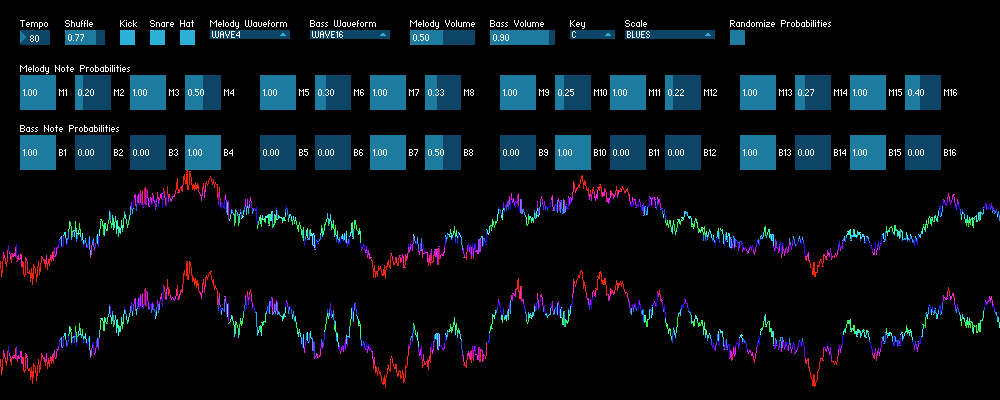
The Melodizer is a variation on the Beat Generator. It will constantly generate a tune with a “melody” and a “bass line” by looking at the settings every measure and generating a measure with those settings. Each big slider represents a 16th note in a one bar loop. The value of each slider is the probability that the program will choose to generate a note on that 16th note when it generates a measure. The actual pitch it chooses for the note is determined by the current key and scale, as well as what the previously generated pitch was. If you look in the Scales.pde file you’ll see that for each pitch in a scale, I’ve encoded which steps in the scale are legal next notes. It’s a pretty crude melody building algorithm, but it does give the output a little bit more musicality. The drum beat is always the same, but there are three toggles that let you turn off the parts of the drum loop you don’t want to hear.
Some other things you can adjust are: tempo, shuffle (how much it “swings”), the waveforms used for the melody and bass lines, the volume of the melody and bass lines, and of course there is a button for randomizing the note probabilities.